-
You must print the entire return to PDF, including:
-
transmittal letter / client letter
-
any signature pages (8879s)
-
standard payment vouchers
-
all states + federal in a single PDF
-
K-1s if any
-
-
Returns must be a client copy
-
PDF cannot have watermarks
Note: Adding custom letters / pages to the PDF will likely generate errors.
If you do need to modify the PDF ensure that:
-
existing bookmarks are consistent and functional
-
new pages are properly bookmarked/linked
-
do password protection / digital signature / access restrictions on the PDF
1040, 990
-
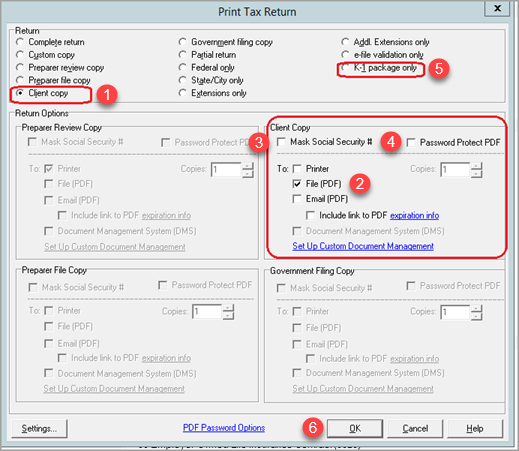
Select the Client Copy radio button.
-
Select the File (PDF) radio button.
-
Do not Mask Social Security #.
-
Do not Password Protect PDF.
-
Click OK to print.
1065, 1120, 1120S, 1041
-
1065, 1120S, and certain 1041 returns must contain a K-1 package.
-
If users wish to remove the K-1 packages, that can be done after the return is uploaded.
-
1065, 1041, 1120 and 1120S Print Settings
-
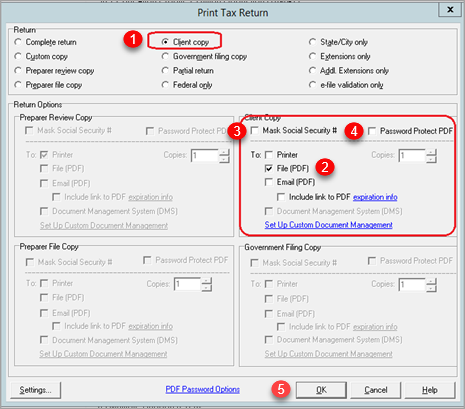
Select the Client Copy radio button.
-
Select the File (PDF) radio button.
-
Do not Mask Social Security #.
-
Do not Password Protect PDF.
-
Click OK to print.
K-1 Packages
-
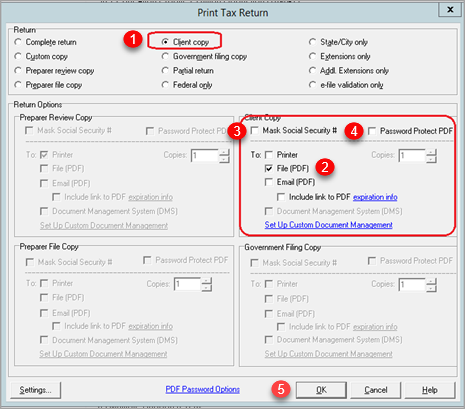
Select the Client Copy radio button.
-
Select the File (PDF) radio button.
-
Do not Mask Social Security #.
-
Do not Password Protect PDF.
-
Select the K-1 Package Only radio button.
-
Click OK to print.