Accessing Client Invites
1. Open the Profile menu.
2. Click on Client Invites

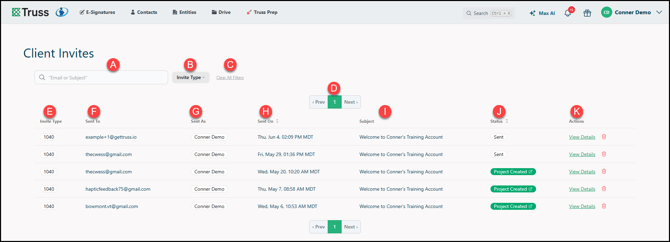
Using the Report
A. You can use the Search to filter by Email or Subject.
B. You can filter the report by 1040, Business, or Trust/Estate.
C. Click Clear All Filters to restore the report to default.
D. Navigate through pages here.
E. The invite type is displayed here.
F. View who the invite was Sent To.
G. Who sent the invite.
H. When it was sent. You can sort by date.
I. The Subject of the outgoing invite email.
J. The current Status of the invitation. You can select this column to filter.
K. Actions to take. You can click View Details to review the email and copy the link. You can also delete the invitation!